Price Variance Between Bill Item and ERP Item Master
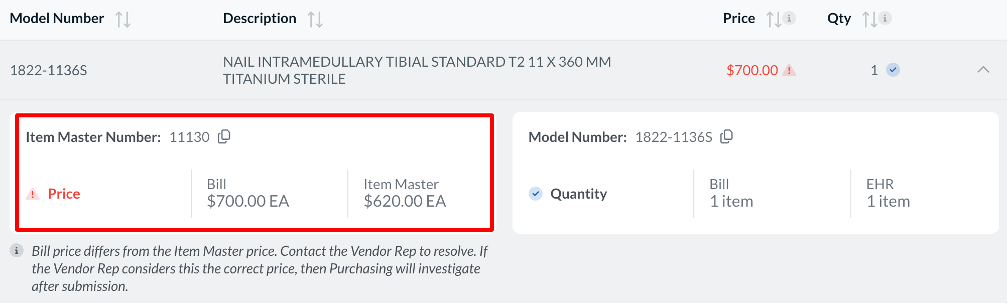
Price Variances result when a Bill Item has a price that is different from the ERP listed price for that Item Master number. This can be resolved by reaching out to the vendor and Supply Chain to determine which one is correct.
Solution
If you have determined that the wrong price is listed in the ERP Item Master:
- Have Supply Chain (or another internal group that manages Item Master and pricing) update the price for the given item to the correct price in the ERP Item Master
- Once this change has been made, the updated price will be reflected in Casechek during the next item master sync. Item Master updates typically occur nightly. However, certain organizations may choose to send updates on different intervals
If you have determined that the wrong price was entered for the Bill Item:
- Reject the Bill with a clear reason for rejection – including all necessary item details and correct price
- The vendor rep will then correct the item and price
- The vendor rep will re-submit the bill to trigger an update in Casechek Bill Review