
Quantity Variance Between Bill Item and EHR
Quantity Variances result when a Bill Item has a quantity different from the EHR Patient Record quantity. This can be resolved by reaching out to the vendor and clinical to determine which one is correct.
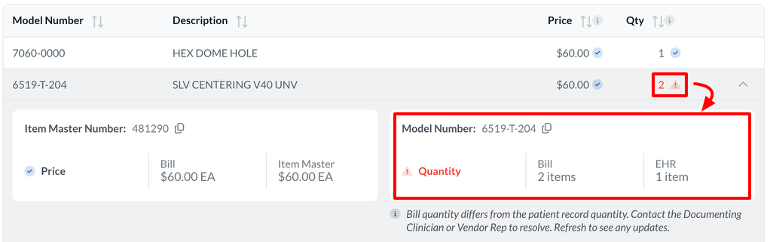
- Have Clinical update the quantity for the given item to the correct quantity in the EHR patient record.
- Re-verify the log or post an addendum to trigger an update in Casechek Bill Review.
If you have determined that the wrong quantity was entered on the Bill:
- Reject the Bill with a clear reason for rejection, including all necessary item details and correct quantity.
- The vendor rep will then correct the item and quantity.
- The vendor rep will re-submit the bill to trigger an update in Casechek Bill Review.